

Most WordPress sites rely on a single CSS stylesheet to handle all of their styling. This file is downloaded every time a user loads a page. For sites with simple designs, it typically sits around 20-30KB. For sites with advanced features like ecommerce or membership content, that file can quickly balloon to 80-100KB.
That stylesheet doesn’t load alone, either. WordPress also serves CSS from any plugins installed on your site, so your theme styles are being delivered alongside additional plugin stylesheets on every page load.
As these files grow, page speed suffers. Minification helps reduce file size, but at a certain point you need a more structural solution: modular CSS. Bloated stylesheets are one of the most common causes of render-blocking resources, and one of the first things we address in any WordPress performance optimization engagement.
What is Modularized CSS?
Take our ecommerce site, My Community Made, as an example. The site includes a seller dashboard on the backend. That dashboard requires its own CSS to render correctly on both mobile and desktop.
With a single theme stylesheet, those dashboard styles load on every page, including the homepage, even though none of those classes or IDs are used there.
Modular CSS solves this by giving each stylesheet a specific page template it belongs to. Every page loads a lightweight base stylesheet, and then pulls in a secondary stylesheet containing only the styles relevant to that template.
How We Make CSS Modular
Using SASS to Manage CSS Modules
A CSS preprocessor like SASS makes it straightforward to organize your styles into separate SCSS files by module. Beyond cleaner authoring, this naturally splits your code into discrete files that can later be enqueued selectively based on the page being loaded.

The Build Process
Once your styles are organized, you create a style-*.scss entry file for each page template you want to target. Using the @use keyword, each entry file imports only the SCSS partials relevant to that template.
For example, our archive pages pull in stylesheets for archive-product, product-categories, categories, search-archives, and states.

For the build process, we use Gulp. Because our template-specific entry files follow a consistent naming convention, Gulp can compile all of them automatically in a single task.

After the build runs, you end up with one .css file per page template.
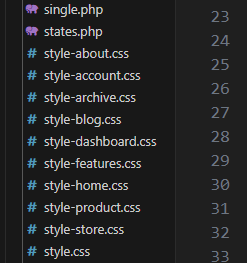
Enqueuing the Proper Stylesheet
In functions.php, we use the is_page_template() conditional to enqueue only the stylesheet that belongs to the current template. Each template gets its own file, nothing more.

The Results
This approach reduced our main stylesheet from 81KB down to 20KB, a 75% reduction in CSS delivered per page. For a site like My Community Made, that kind of CSS reduction has a direct impact on Core Web Vitals scores and overall website performance optimization. It’s the type of structural change that generic WordPress speed optimization plugins can’t replicate, because it requires understanding how your templates are actually built.
You can take this further by pairing it with a plugin like Asset CleanUp Pro, which lets you dequeue specific stylesheets and scripts on a per-page basis. It handles cases that are harder to manage through functions.php alone and rounds out a solid frontend performance workflow.
Managing this kind of frontend performance work over time, as new plugins are added and templates evolve, is a core part of our WordPress maintenance service.